German taxes for Interactive Brokers & Tastytrade
Instead of hours in Excel: capi.tax prepares your trades at Interactive Brokers, LYNX, CapTrader and Tastytrade FIFO-compliant for the Anlage KAP — automatically and locally in your browser.
- FIFO-compliant
- Bundesbank rates
- § 20 EStG
- Tax years 2021–2025
The challenge
Why a German tax return with Interactive Brokers & Tastytrade is so much work
Interactive Brokers and Tastytrade hand you a trading statement, not a German Steuerbescheinigung. Everything the Finanzamt wants has to be derived from it.
-
No Steuerbescheinigung
A German bank hands the tax office finished numbers. Your US broker hands you raw trades — you self-declare.
-
FIFO across partial sales
Sold part of a position you bought in tranches? Every lot has to be matched in the right order, by hand.
-
A different rate every day
Each dollar amount converts at the official Bundesbank rate for its own trade day — not the year-end rate.
-
Vorabpauschale is missing
Accumulating ETFs still owe a yearly amount. It appears nowhere in your broker report.
-
Options have their own rules
Premiums, closing, expiry, assignment and exercise are each taxed differently — and land in different pots.
-
Withholding tax per country
How much foreign tax you may actually credit depends on the treaty rate and the 25 % ceiling.
capi.tax does all of it in your browser — in minutes, and you can check every line.
Process
How It Works
In four simple steps to your finished tax preparation – automated and aligned with German tax rules.
- 1
Choose Broker
Select Interactive Brokers or Tastytrade
CSV (Tastytrade, IBKR) or XML (IBKR Flex Query) - 2
Upload Export File
Import transaction data via drag & drop
Stocks, ETFs, Options, Futures - 3
Review & Calculate
Automatic FIFO calculation with EUR conversion
FIFO compliant according to German law - 4
Export for KAP
Get ready-to-use report for Anlage KAP
Excel, PDF or CSV
No Server, No Cloud
Your financial data never leaves your computer. Everything is calculated locally in your browser.
We use anonymized usage statistics to improve our service. No personal data or transaction contents are collected. Details in the terms.
Capabilities
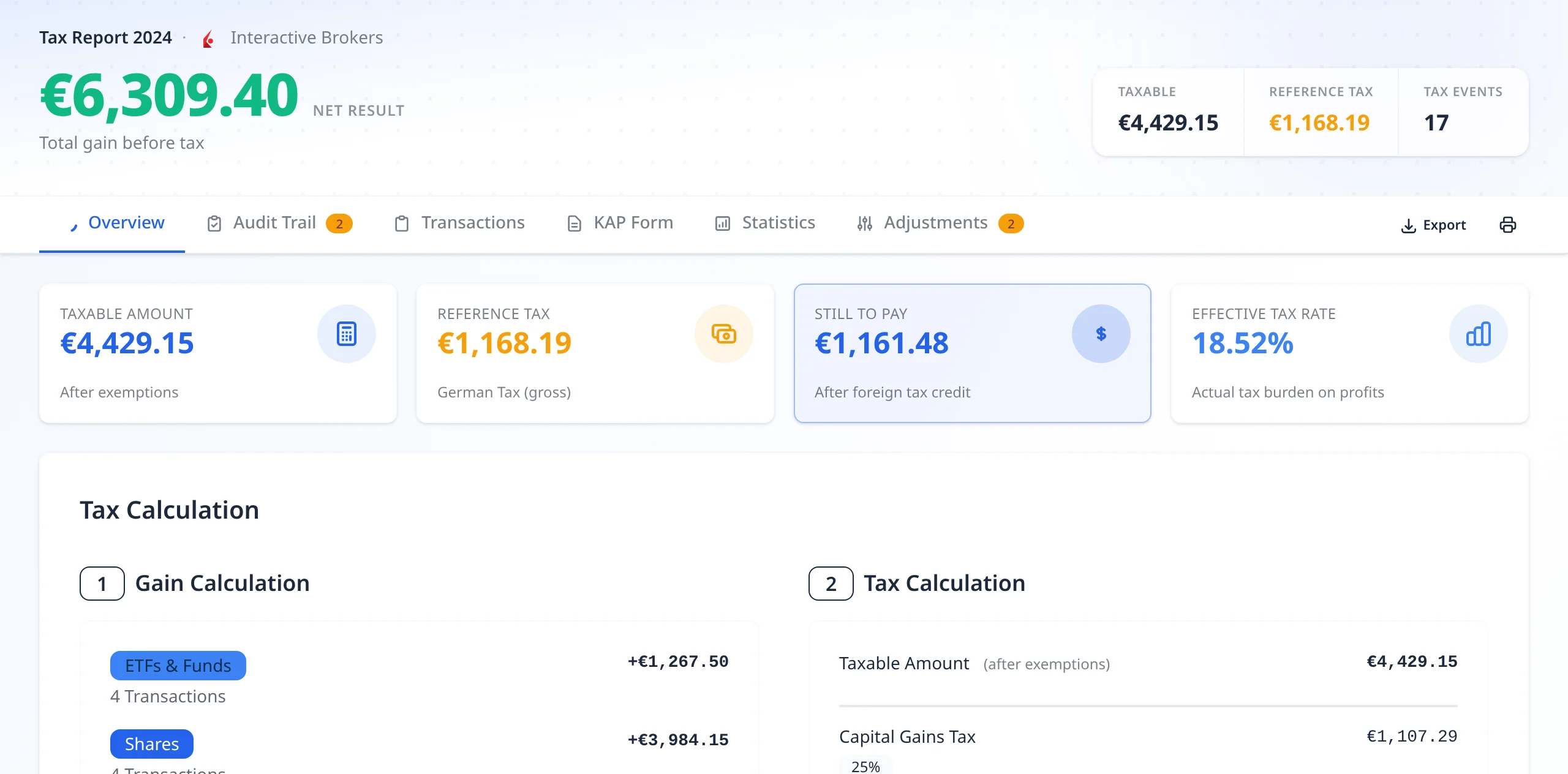
What your result looks like
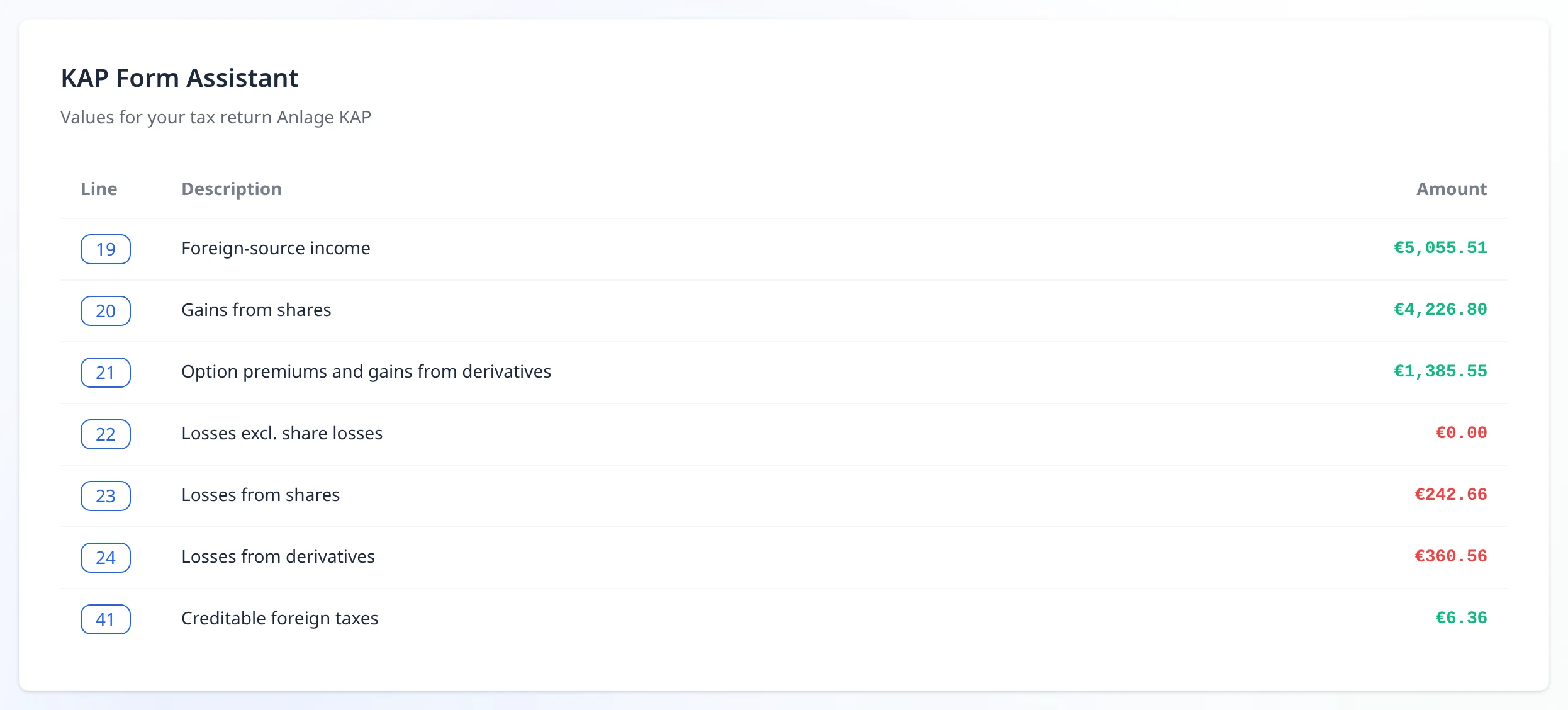
Real views from capi.tax, computed from the sample file.
Every line of the Anlage KAP
Gains, losses and creditable withholding tax, each with its form line number, ready to copy into ELSTER. Converted at the Bundesbank rate of each trade day, exact to the cent.
- Bundesbank reference rates
- Rules per tax year
- No floating-point drift
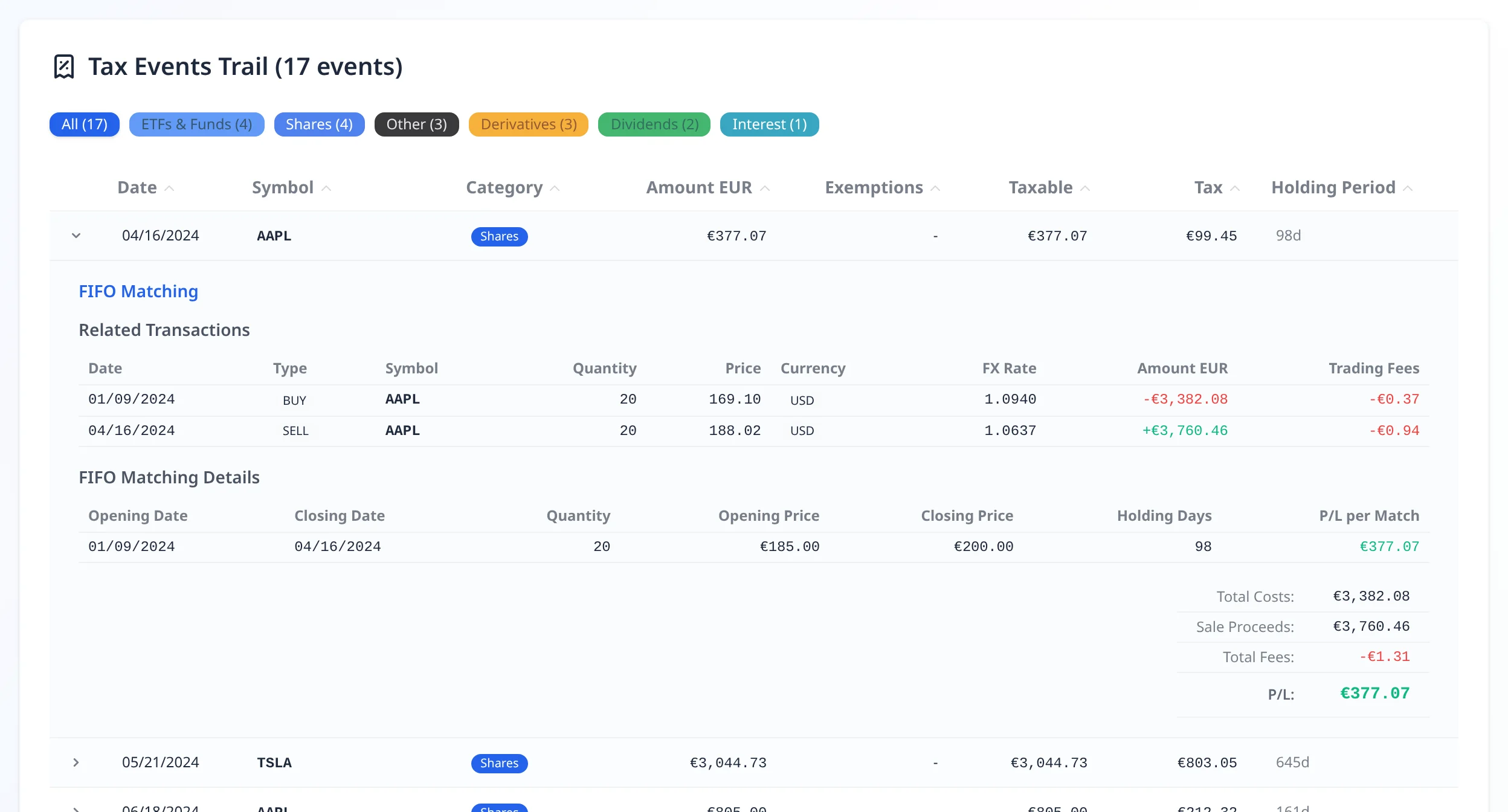
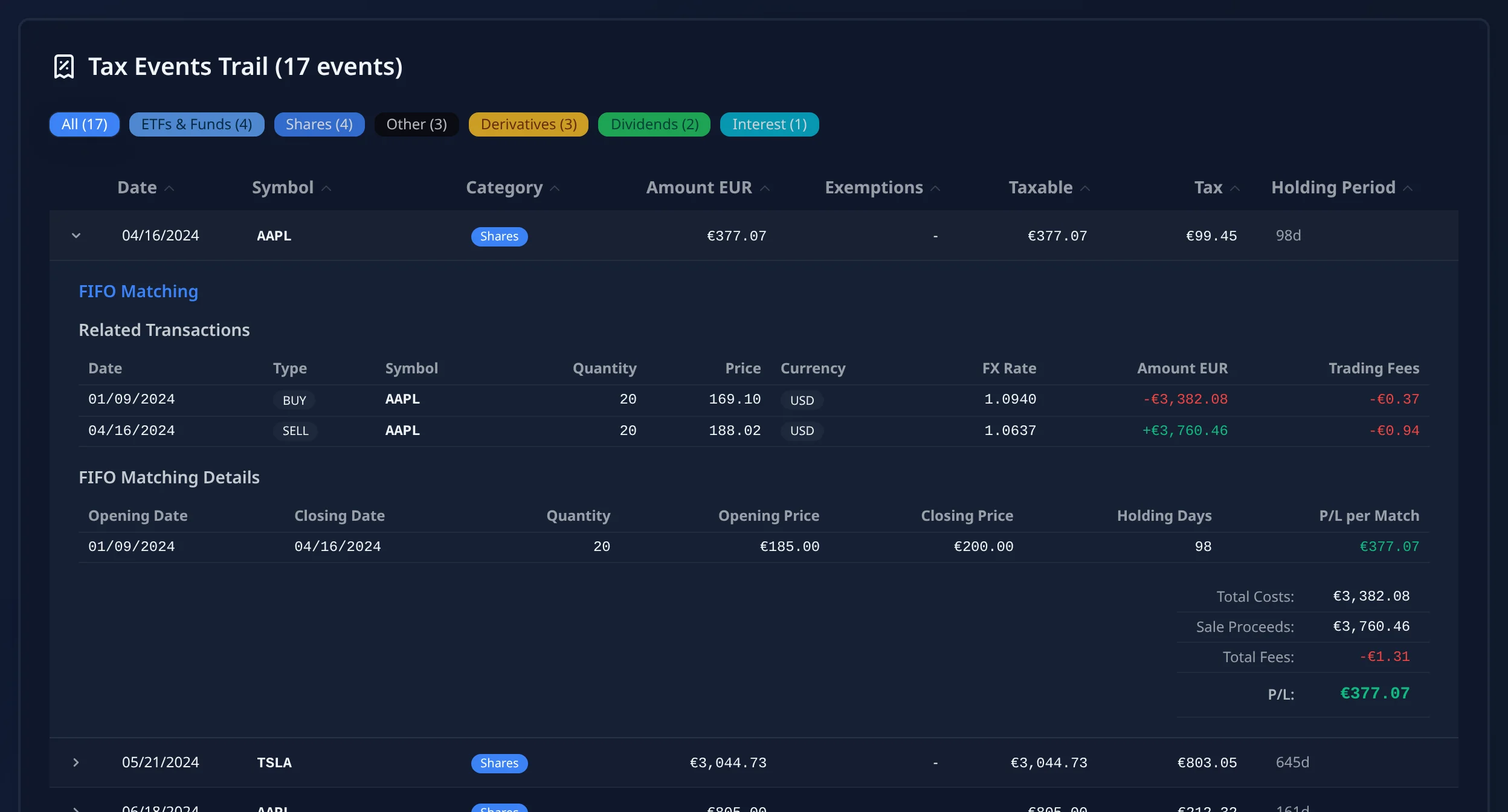
Traceable to the line
See which purchase was matched to which sale, and export the full trail for your records or your advisor.
- Every FIFO match visible
- Warnings instead of silent guesses
- Excel, PDF & CSV export
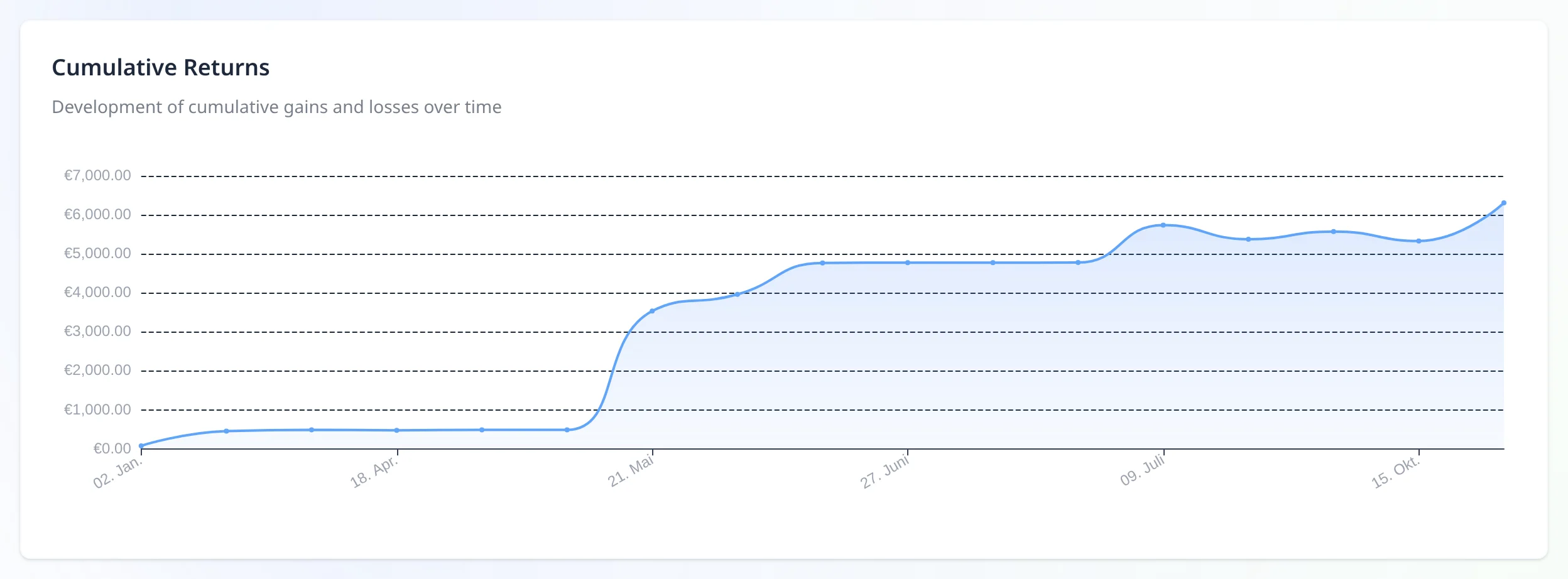
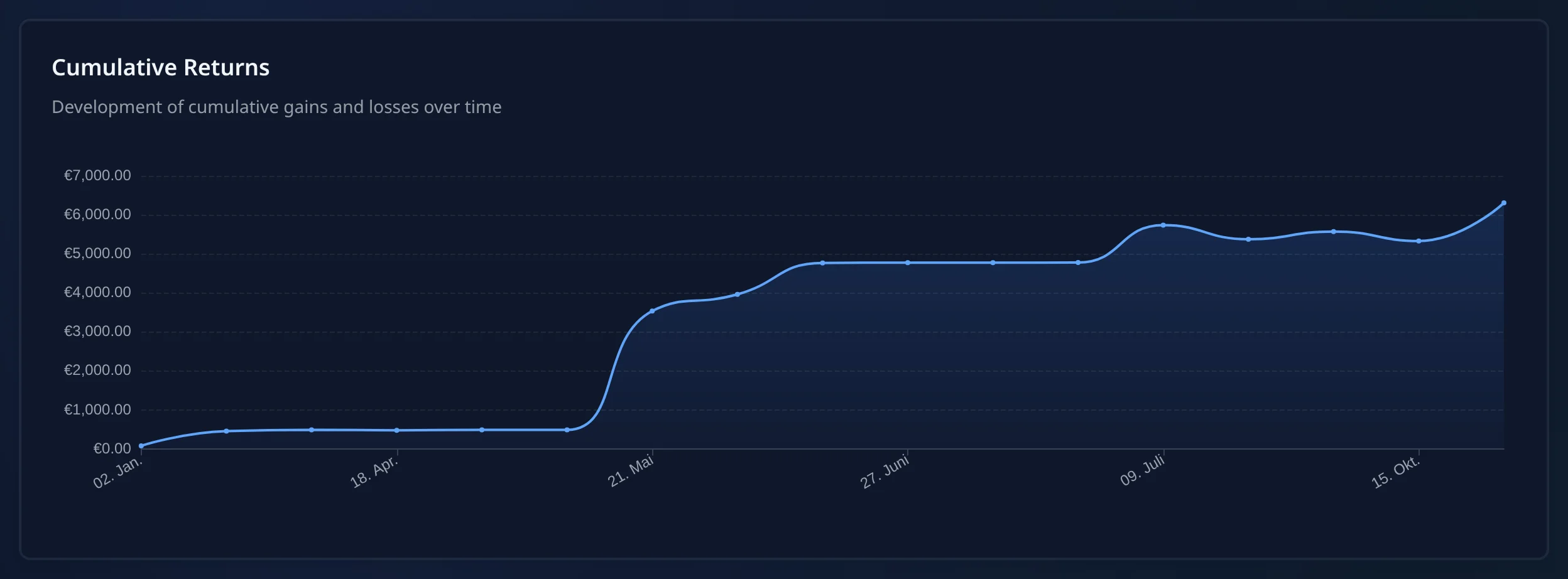
Your trading year at a glance
Monthly results, cumulative gains and win rate, from the same numbers as your tax figures.
Integrations
Interactive Brokers, LYNX, CapTrader & Tastytrade
Export the statement your broker already offers. No API access, no broker password, no account with us.

Interactive Brokers
Fully supportedComplete import of all transaction types from Activity Statements (CSV) or Flex Queries (XML)
Supported reports:
- Activity Statements (CSV), Flex Queries (XML)
Also for introducing brokers such as LYNX and CapTrader

Tastytrade
Fully supportedImport of trades, options and dividends from CSV exports
Supported reports:
- Transaction History (CSV)
More brokers on request - contact us
Read the export guidesSupported Transaction Types
From a simple share sale to an assigned option — sorted into the right German tax category.
Stocks & ETFs
- – Buy and sell
- – Dividends
- – Opening positions from earlier years
- – Partial exemption by fund type
Options
- – Long/Short positions
- – Exercise and assignment (Tastytrade: still limited)
- – Expired options
Futures
- – Futures on indices, commodities, currencies
- – Treated as Termingeschäfte (§ 20 EStG)
- – Beta – limited multiplier support
Other
- – Interest income
- – Currency gains (coming soon)
- – Withholding tax
- – Fees
Loss offsetting according to German tax law
Support for the relevant transaction types under § 20 EStG with correct categorization
The difference
By hand, or in a few minutes
The work does not disappear; capi.tax just does it for you. Here is what each step costs you either way.
| Step | By hand | With capi.tax |
|---|---|---|
| Matching sales to purchases | Track every lot in the right order | FIFO per position, automatically |
| Converting to euro | Look up a rate for every trade day | Bundesbank rate per trade day |
| Vorabpauschale for ETFs | Apply the formula to each purchase lot | Calculated per lot, with proration |
| Option events | Separate premium, expiry and assignment | Recognised and categorised |
| Foreign withholding tax | Check the treaty rate per country | Creditable amount per country |
| Checking the result | Re-read your own spreadsheet formulas | Every match visible and exportable |
Show the full feature list Hide the feature list
Comparison
What is supported — gaps included
The same list we check the engine against. Where something is missing or still rough, it says so.
| IBKR | Tastytrade | |
|---|---|---|
| Data Formats | ||
| CSV Export | ✓ | ✓ |
| XML Flex Query | ✓ | ✕ |
| Several files or accounts in one run | ✕ | ✕ |
| Transaction Types | ||
| Stocks & ETFs | ✓ | ✓ |
| Options | ✓ | ✓ |
| Futures | ~ | ~ |
| Dividends | ✓ | ✓ |
| Interest | ✓ | ✓ |
| Corporate Actions | ✕ | ✕ |
| Cryptocurrencies | ✕ | ✕ |
| Tax Features | ||
| FIFO Calculation | ✓ | ✓ |
| Currency Gains | Planned | Planned |
| Withholding Tax | ✓ | ✓ |
| Partial Exemption | ✓ | ✓ |
| Vorabpauschale | ✓ | ✓ |
| Loss Offsetting | ✓ | ✓ |
| Option Assignment | ✓ | Planned |
| Adding opening positions | ✓ | ✓ |
| Export Formats | ||
| KAP-Ready Report | ✓ | ✓ |
| Anlage KAP-INV | ~ | ~ |
| Excel Export | ✓ | ✓ |
| PDF Export | ✓ | ✓ |
Tax knowledge
Vorabpauschale, withholding tax, options & more
Plain-language explanations of the German rules behind your report — with the statutory basis, written for investors rather than tax professionals.
Vorabpauschale
Why accumulating ETFs are taxed yearly, and how the amount is derived.
Options & writing
Premiums, expiry, assignment and exercise — and where each one lands.
Foreign withholding tax
How much foreign withholding tax you can actually credit in Germany.
Funds & Teilfreistellung
The share of fund income that stays tax-free, by fund type.
Offsetting losses
Which losses offset which gains — and what changed in 2024.
Currency gains (§ 23)
When holding dollars becomes a taxable gain of its own.
Corporate actions
Splits, spin-offs and mergers, and what they do to your cost basis.
Flat tax & allowance
The 25 % flat tax, the allowance, and when your own rate is lower.
Anlage KAP, KAP-INV & SO
Which figure belongs on Anlage KAP, KAP-INV or SO.
Security & Privacy
Your financial data is sensitive. That's why we focus on maximum security and complete transparency.
100% Browser Processing
All calculations happen exclusively in your browser. We cannot see your data even if we wanted to.
GDPR Compliant
Processed under the GDPR. Anonymous, cookie-free usage statistics, hosted in the EU and switchable off at any time – never with your transaction data.
Transparent Calculations
All calculations are traceable and auditable. You can verify every step.
Our Promise
- No Data StorageYour data stays in your browser - no server transmission
- No SharingYour data is never shared with third parties
- No Hidden CostsFree to use, no account, no payment details
- Regular UpdatesAdaptation to current tax laws and broker formats
Support
FAQ: German taxes with a foreign broker
Answers to the most important questions about our service.
Yes. A German bank withholds the tax directly, which settles it. Interactive Brokers and Tastytrade do not — and because no German tax was withheld, you are required to declare it (§ 32d Abs. 3 EStG). That is an obligation, not an option.
Because you have no German Steuerbescheinigung. A German broker runs FIFO, currency conversion, withholding tax and loss offsetting for you and reports finished figures. A US broker gives you raw data — the classification is up to you.
Interactive Brokers and Tastytrade. Plus every introducing broker on the IBKR platform — LYNX and CapTrader among them: their Activity Statement comes out of the same IBKR system, so you simply pick Interactive Brokers.
Capital income on Anlage KAP, fund and ETF income on Anlage KAP-INV, private disposals such as currency gains on Anlage SO. The exact line numbers change every year — check them against the official instructions for the year you are filing.
At most the rate the US is allowed to keep under the double-taxation treaty: 15 % on dividends — and at most 25 % per item of income (§ 32d Abs. 5 EStG). With a valid W-8BEN the US withholds exactly those 15 %, and all of it is creditable.
For private investors, on Anlage KAP — not Anlage SO. Up to and including 2024, writer premiums and forward transactions had their own lines there; since the 2025 form they are part of the total capital income, and losses also go on the line for losses other than share losses.
Yes. Your data never leaves your computer. Everything is calculated in your own browser, so there is no upload and no copy on a server. We have no technical way to see your transactions. Once you close the page, the data is gone.
capi.tax is currently free. It is a private project — feedback is very welcome. There is no subscription, no payment details and no account.
No. capi.tax prepares your data and does not constitute tax advice. It reads your broker export, converts the amounts to euro, applies the rules of German tax law and gives you a structured summary for your tax return. The figures are a starting point, not a final verdict. For your personal situation, please review the result and talk to a tax advisor (Steuerberater).
Still have questions? Read the full help guide
Ready for Your Tax Return?
With capi.tax, save time and avoid errors when calculating your capital gains from US brokers
No tax advice — capi.tax prepares your data for Anlage KAP.
Modern tax preparation
for German investors
Security
- Your data stays local
- GDPR compliant
- No tax advice
© 2026 capi.tax – Data preparation tool. This is not tax advice. Consult a tax advisor for questions. · 8773acd